
Static Rule Help

Calendar 👁️ 774

The static rule allows you to define the composition form of the website URL according to actual needs.

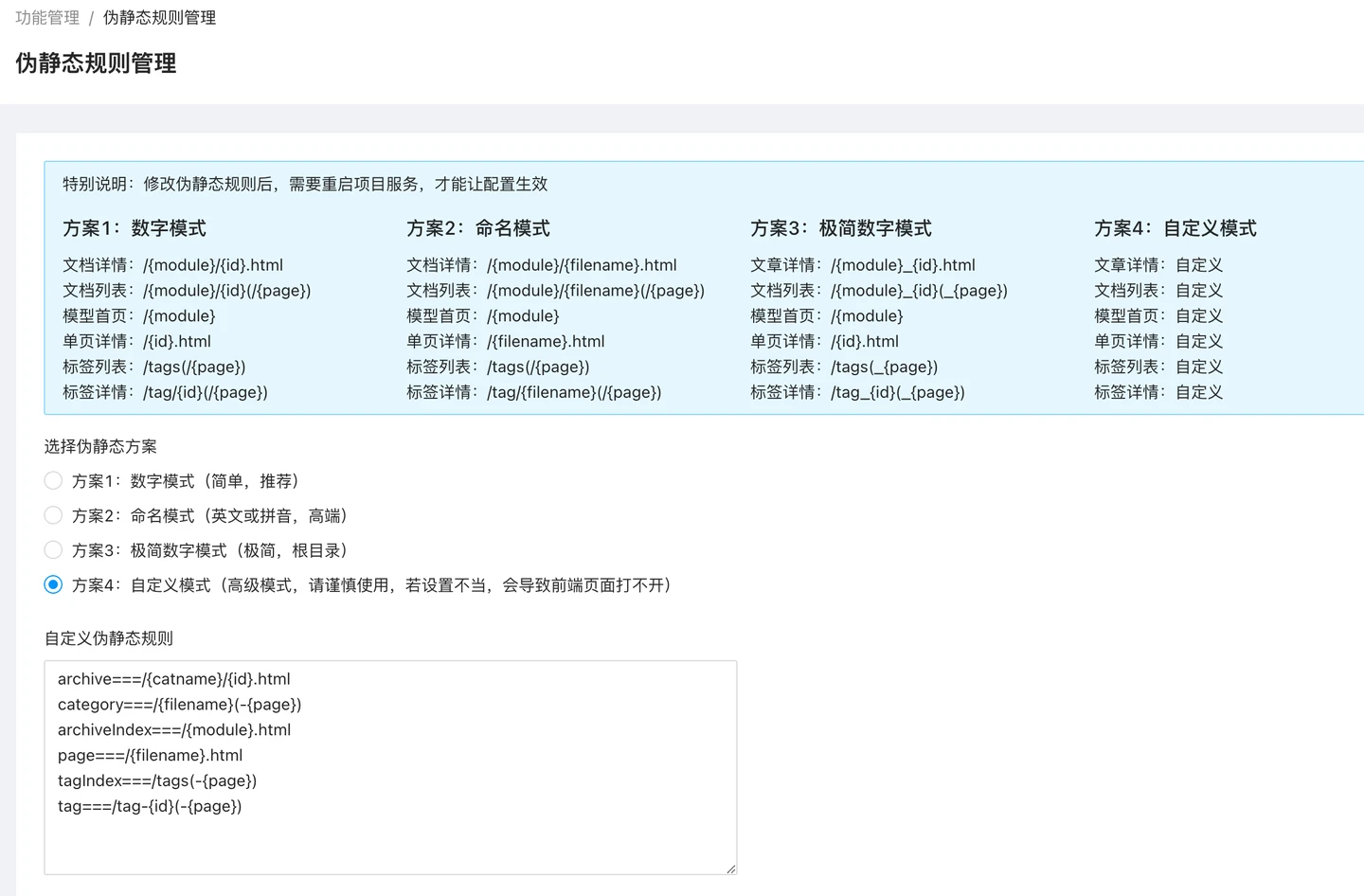
For the convenience of users, to reduce the trouble of configuration, the system is built-in with 4 ready-made pseudo-static rules that can be used directly after selection.
plugin-rewrite-1

The default pseudo-static rules are:

  1. In digital mode, the document details, document list, single page details, document tags, all use {id} as the basis for URL generation, and are usually used more on Chinese sites.
  2. Model naming pattern model naming pattern, generally used for English websites
  3. Category naming pattern 1 category naming pattern 1, generally used for Chinese websites
  4. Category naming pattern 2 category naming pattern 1, generally used more for English websites

To allow you to customize the link display form of the website content, the system also provides a custom mode.

The custom mode belongs to the advanced mode, it is necessary to configure it according to the requirements in actual use, otherwise it may cause the page to not open.

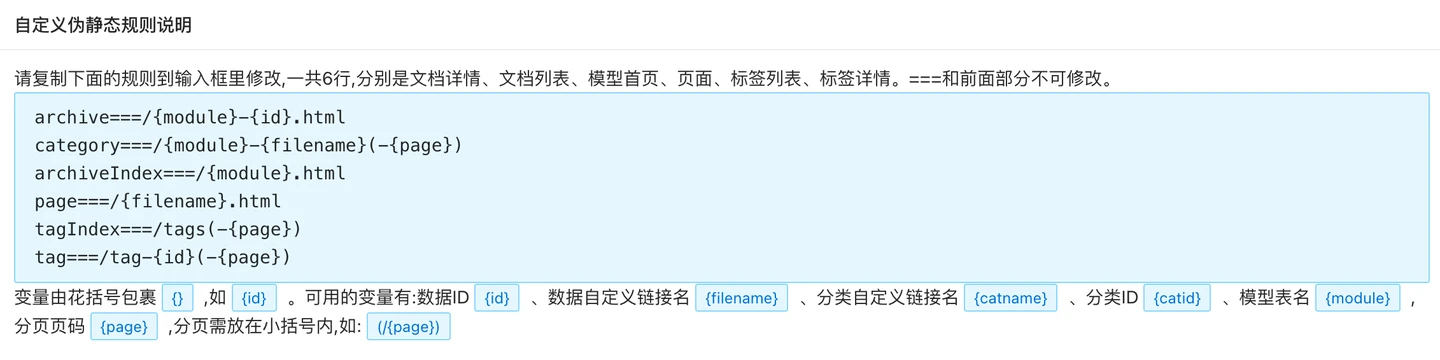
Custom static routing rule mode can set up 6 groups of static routing rules, each corresponding to different pages, including document details, document list, model homepage, page, tag list, and tag details.===and the preceding part may not be modified.

Custom rules have already listed some available rules, you can copy these rules to further modify them into rules that meet your needs.

As rules:

archive===/{module}-{id}.html
category===/{module}-{filename}(-{page})
archiveIndex===/{module}.html
page===/{filename}.html
tagIndex===/tags(-{page})
tag===/tag-{id}(-{page})

In the actual rule configuration, each rule is paired by规则名===规则值. Rule names include:archive/category/archiveIndex/page/tagIndex/tag.

In the rule values, there are some commonly used variables that can be selected and used. Variables are enclosed in curly braces{}, such as{id}. Available variables: data ID{id}Custom data link name{filename}Custom category link name{catname}Category ID{catid}Model Table Name{module}, page number{page}, the page number should be placed within parentheses, such as:(/{page}).
plugin-rewrite-11

By combining variables, you can generate some complex URL static forms.

Related articles

Link Push Help

The use of the search engine link push function can let you notify major search engines of the documents you publish in a timely manner, so that their spiders can come and crawl the pages in time, achieving the effect of promoting page inclusion.The current system supports the following active push search engines: Baidu Search, Bing Search.The Baidu Search Active Push Interface needs to be used. You need to use the Baidu Search Resource Platform https://ziyuan.baidu.co

2022-06-21

How to use the DiDi Friend Chain automatic chaining function in AnqiCMS (AnqiCMS)

Exchanging friend links is something every website owner has to go through.Many friends have spent a lot of effort on exchanging friendship links, but the efficiency of the exchange is relatively low, resulting in wasted time.The DiDi Friend Link Platform (https://didi.seowhy.com/) has launched a feature for automatic friend link exchange, which can automatically complete the exchange of friendship links, alleviating the heavy workload of friendship link exchange.As a fully functional C

2022-11-08

Introduction to AnQi CMS multilingual site feature

Starting from AnQiCMS version 3.4.7, it supports more powerful multilingual site features.AnQiCMS's multilingual feature supports two implementation methods, one is to use an independent multi-site architecture (suitable for large-scale/customization needs), and the other is a single-site translation plugin architecture (suitable for small and medium-sized/rapid iteration).Two ways to implement multilingual functionality, each with its own advantages and disadvantages, please see the following description.

2025-03-29

How to use the multilingual site feature tutorial one: Independent multilingual site architecture

Starting from AnQiCMS version 3.4.8, it supports more powerful multilingual site features.AnQiCMS's multilingual feature supports two implementation methods: one is to use a separate multi-site architecture (suitable for large/customization needs), and the other is a single-site translation plugin architecture (suitable for small/mid-sized/quick iteration).This will guide you through the multi-language feature of AnQiCMS: Method 1: Independent multi-site architecture (suitable for large/customized needs) This method has higher flexibility, but it also requires higher requirements for site operators, more configuration, and coding work

2025-03-29

How to use the multilingual site feature tutorial two: Single site translation plugin architecture

Starting from AnQiCMS version 3.4.8, it supports more powerful multilingual site features.AnQiCMS's multilingual feature supports two implementation methods, one is to use an independent multi-site architecture (suitable for large-scale/customized needs), and the other is a single-site translation plugin architecture (suitable for small and medium-sized/rapid iteration).Below you will be guided through the multi-language feature of AnQiCMS: ▶ Method 2: Single-site Translation Plugin Architecture (suitable for small and medium-sized/Agile iteration) Operation steps Step 1: Enable the multi-language site feature Log in to the AnQiCMS backend management interface.

2025-03-29